Networking Ollama and integrating it with apps
While I am, as I have said, not a big fan of AI, I have been doing my due diligence to learn about it in the event that the need to use it should arise. Again, I clarify "need" not as a lighthearted, "I need to know this or that, so I'll just ask AI...", but rather a need such as a work requirement. I hope this will be my final article in this series about AI, at least for the time being.
Being in the IT field, and a somewhat technical person, I started out with one overarching goal in learning about AI: how can I self host an AI instance that I can integrate with some other program. While I may not be a fan of AI, I have learned quite a few technical things along the way, and I'm glad that I set out on this "adventure". Today's post is the latter end of that trek, mainly the technical ability to use or integrate AI into some other program.
Of course, as you recall from my first post [1], I am self hosting various AI models, such as llama3.2 and llama3.3 with Ollama, the python based open source interface. In my second post [2], I made a note about how to use the API of Ollama to send requests and receive the reply. But I wanted to make sure that I understood not just the API interface, or how to host my own AI models, but how to actually integrate or use it in another program or app for daily workflow, rather than just as a chat tool. Could I feed it code and have it spit something (however untrustworthy) back out to me?
First, I wanted to know how to access my self hosted models from another computer. For security reasons, I didn't want to open up my computer to the internet, but did want to prove I could do it within my own home network. By default, Ollama actually only accepts or listens to requests on the local loopback network, lo, on the loopback address, 127.0.0.1, port 11434. Trying to access it from another computer in the network would just get you an access denied response:
$ curl http://192.168.5.251:11434/api/tags
curl: (7) Failed to connect to 192.168.5.251 port 11434 after 61 ms: Couldn't connect to server
In this request, I am requesting the tags, or essentially list, of available models. Because I am requesting this information from another computer over the local network, I receive the "Failed to connect" error. If I run this command on the machine hosting the models, I get the proper response, which looks like this:
{"models":[{"name":"llama3:latest","model":"llama3:latest","modified_at":"2026-08-29T06:22:48.871118746-08:00","size":4661224676,"digest":"365c0bd3c000a25d28ddbf732fe1c6add414de7275464c4e4d1c3b5fcb5d8ad1","details":{"parent_model":"","format":"gguf","family":"llama","families":["llama"],"parameter_size":"8.0B","quantization_level":"Q4_0","context_length":8192,"embedding_length":4096},"capabilities":["completion"]}...........EDITED FOR BREVITY..........
So, how can I get that to work over the local network? There are two ways that I know of. The first is to make a few routing rules for the server computer to bind incoming traffic on the network to the loopback address. I tried this:
sudo iptables -t nat -A PREROUTING -i eno1 -p tcp --dport 11434 -j DNAT --to-destination 127.0.0.1:11434
sudo iptables -A FORWARD -i eno1 -o lo -p tcp --dport 11434 -d 127.0.0.1 -j ACCEPT
sudo iptables -t nat -A POSTROUTING -o lo -j MASQUERADE
This almost worked, but not quite. For some reason, this worked to route traffic from the LAN to the loopback device, allowing the server to accept requests over the local network and pass them to the local loopback interface and give the request to Ollama. Unfortunately, it didn't work to route the reply back to the computer making the request. I'll be honest, I'm not sure why. I must be getting rusty in my iptable routing, and looking at various examples online didn't seem to shed light on my problem. But in theory, this, or something close, should work.
The second method to expose Ollama to the local network is to change the environment variable for "OLLAMA_HOST" to be 0.0.0.0:11434, meaning to listen to anybody on that port, not just local loopback. So, I set the variable:
export OLLAMA_HOST=0.0.0.0:11434
And I tried to run Ollama. But I still got the denied errors, and Ollama completely ignored this export. So, I set it in my system variables by editing /etc/environment to include it, making it a global system variable that is set all the time, and one which is persistent. But that didn't work either. Ollama just ignored it, again. I read around online and tried several other things, like passing it as an argument when calling Ollama, like so:
OLLAMA_HOST="0.0.0.0:11434" ollama serve
But, Ollama didn't care. It was getting to be a bit frustrating. For grins, I asked llama3 how to do this, starting with questions about which port to use, etc., but at one point it said that you don't "self host" Ollama, and then gave me a story about using port 8080, because that is the "default port for Ollama", yet the default (per Ollama's documentation)[3] is actually port 11434. Here was llama3's output:
>>> what is ollama's default port when self hosted?
When self-hosting Ollama, the default port is **8080**.
In the `ollama.config` or `ollama.json` file, the `listen_port` setting is
set to 8080 by default, which means Ollama will listen for incoming
requests on port 8080.
So, when you're hosting Ollama locally, you can access it by visiting
`http://localhost:8080` or `http://<machine_ip>:8080` (replace
`<machine_ip>` with the IP address of the machine running Ollama) in your
web browser.
So I realized that it must be different when using Ollama as a snap, and it turns out this was the case. Your Ollama environment variables are useless when you run Ollama as a snap. Once I figured that out, a little bit of searching in the documentation lead me to where I needed to go:
sudo snap set ollama host=0.0.0.0:11434
This command sets the OLLAMA_HOST variable for the snap. It would appear that the usual OLLAMA_ variables are all there, just without the OLLAMA_ prefix. You can also read them with 'snap get' instead! After setting that variable in the snap, it was now a trivial matter to test access from another local network machine:
~$ curl http://192.168.5.251:11434/api/tags
{"models":[{"name":"llama3:latest","model":"llama3:latest","modified_at":"2026-08-29T06:22:48.871118746-08:00","size":4661224676,"digest":"365c0bd3c000a25d28ddbf732fe1c6add414de7275464c4e4d1c3b5fcb5d8ad1","details":{"parent_model":"","format":"gguf","family":"llama","families":["llama"],"parameter_size":"8.0B","quantization_level":"Q4_0","context_length":8192,"embedding_length":4096},"capabilities":["completion"]},{"name":"llama3:8b","model":"llama3:8b","modified_at":"2026-08-29T06:20:44.08856588-08:00","size":4661224676,"digest":"365c0bd3c000a25d28ddbf732fe1c6add414de7275464c4e4d1c3b5fcb5d8ad1","details":{"parent_model":"","format":"gguf","family":"llama","families":["llama"],"parameter_size":"8.0B","quantization_level":"Q4_0","context_length":8192,"embedding_length":4096},"capabilities":["completion"]},{"name":"llama3.2:latest","model":"llama3.2:latest","modified_at":"2026-08-26T04:58:50.45297552-08:00","size":2019393189,"digest":"a80c4f17acd55265feec403c7aef86be0c25983ab279d83f3bcd3abbcb5b8b72","details":{"parent_model":"","format":"gguf","family":"llama","families":["llama"],"parameter_size":"3.2B","quantization_level":"Q4_K_M","context_length":131072,"embedding_length":3072},"capabilities":["completion","tools"]}]}
Great! Now I could access my AI models from any computer within my local network! I did do some testing from external networks to make sure I couldn't reach it from outside, which firewall rules on my router do stop. Satisfied with that, I then set about to the real task, attaching it to some app or program to "integrate" it into a workflow. One program I use a bit is Godot, the game engine which has it's own IDE, so I decided to try that.
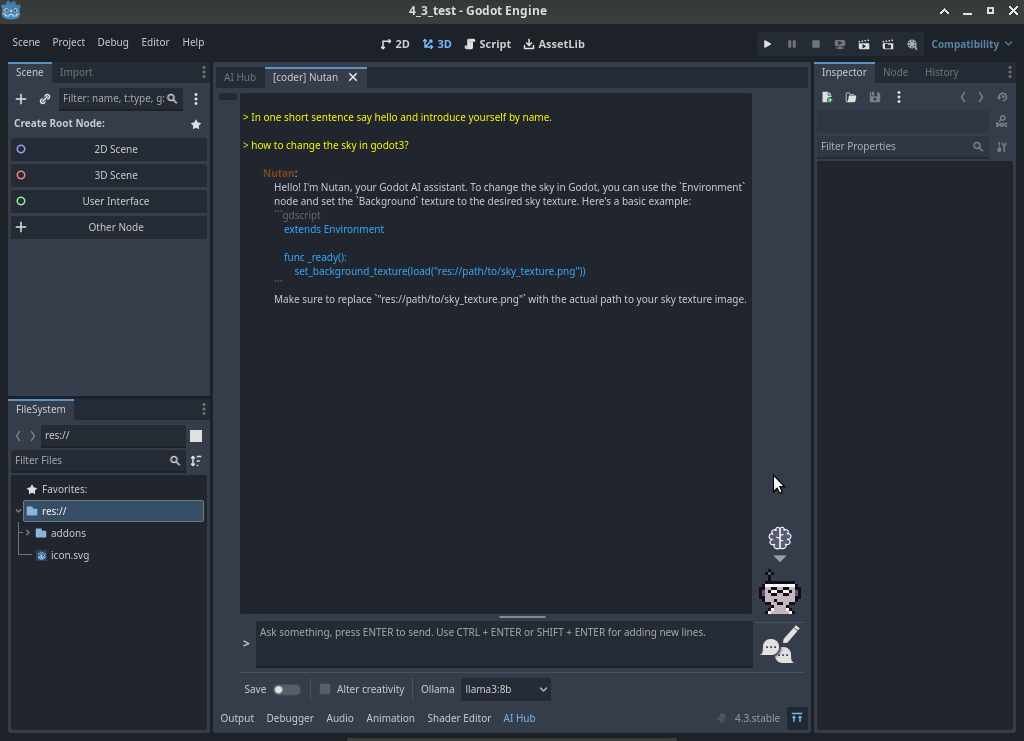
Turns out it was pretty easy. In Godot 3x and 4x, you can use the Godot Copilot Plugin [4], which allows your usual Godot interface to have an extra tab where you can integrate an AI, but it wouldn't let you choose a self hosted instance. In Godot 4.3+, however, you could use the Godot AI Assistant Hub plugin, of which our title picture above shows how you can integrate your own locally hosted AI, asking it questions and showing it highlighted code within the development environment.
Feeling that the goal is now met, I can now move on to other things. While I don't intend to use AI personally, I did learn a lot by trying to self host, network, and integrate one into a "daily workflow" of something that I could use, even if I don't intend to actually do it.
Linux - keep it simple.
[1] https://alaskalinuxuser3.ddns.net/Running%20a%20local%20AI%20model%20with%20Ollama%20and%20AI%20pitfalls.html [2] https://alaskalinuxuser3.ddns.net/Using%20a%20local%20AI%20model%20with%20API%20and%20further%20response%20to%20API%20pitfalls.html [3] https://docs.ollama.com/faq [4] https://github.com/minosvasilias/godot-copilot/tree/3.x [5] https://github.com/FlamxGames/godot-ai-assistant-hub
Using a local AI model with API and further response to API pitfalls
After my blog post about running your own AI locally, I received some feedback regarding my arguments against using AI. Today, I'd like to respond to that feedback, but also I want to make a note for myself about how to use your locally run AI model via the API, rather than directly typing in the prompt of Ollama.
Using Ollama via API
So, first things first. How to use the API. Begin by launching the AI. In this case, I downloaded a bigger and better AI model, llama3.3 with 8B, or 8 billion parameters, as opposed to the llama3.2 model I was using that only had 3 billion parameters. I pulled it like so:
$ ollama pull llama3:8b
pulling manifest
pulling 6a0746a1ec1a: 100% ▕██████████████████████████████████████████████████████████ ▏ 4.7 GB/4.7 GB 10 MB/s 0s
pulling 4fa551d4f938: 30% ▕█████████████████ ▏ 3.7 KB/ 12 KB
pulling 3f8eb4da87fa: 100% ▕███████████████████████████████████████████████████████████▏ 485 B
verifying sha256 digest
writing manifest
success
Nothing new, we did this in the last article. Then I run the new model:
alaskalinuxuser@alaskalinuxuser-CF-52NKE102M:~$ ollama run llama3:8b
Now that llama3.3 is running, I then open another terminal, and type this in it:
$ curl -X POST http://localhost:11434/api/generate -d '{
"model": "llama3:8b",
"prompt":"Why is the sky blue?"
}'
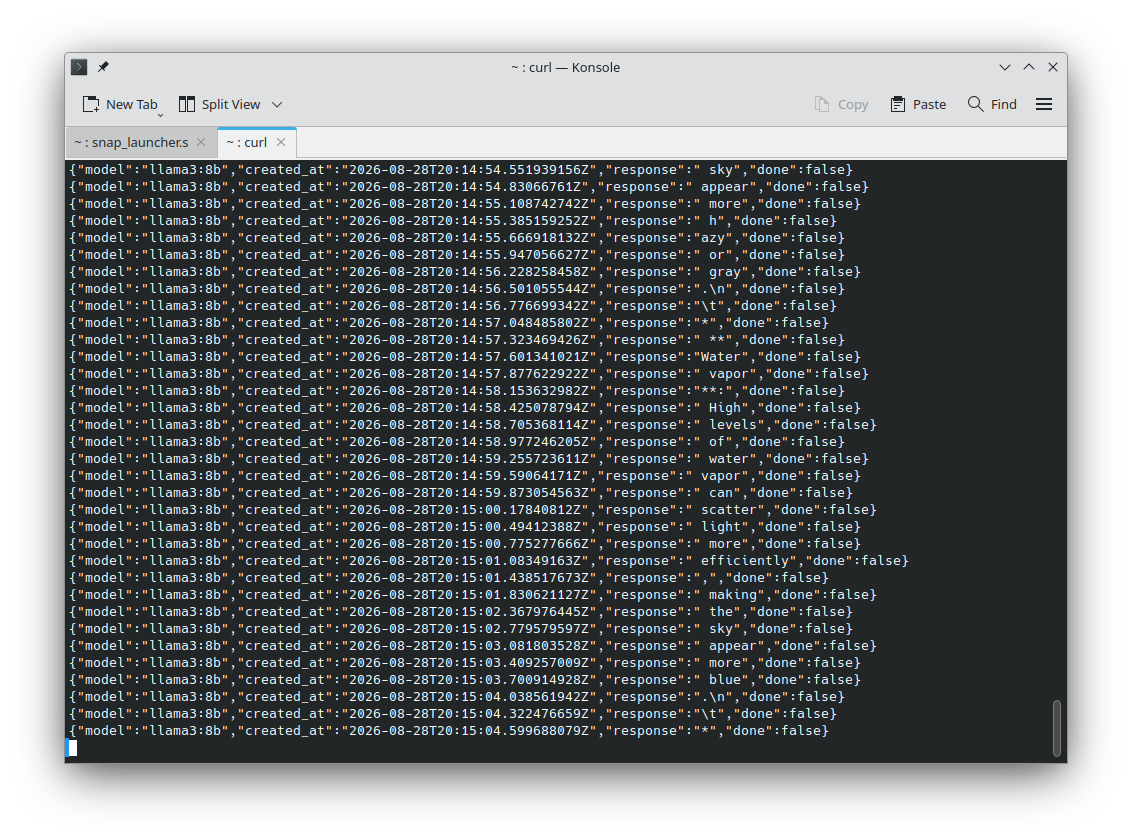
Here I'm just using curl to call and pull the output from the API. Essentially, I give it a destination (localhost) a port number (11434), and tag which running model I want (note it will not start a model that is not running) and enter my prompt. Pretty simple. I just wanted to write this down so I can reference it later. Though I suppose I could have just asked llama....
Responses to questions about my previous AI article.
In my previous article [1] about AI models, I pointed out how you couldn't trust AI because it:
Hallucinates or makes things up.
Often has errors or is inacurate.
Takes more time to review it's output than to make it yourself.
Doesn't make you smarter.
From which I received several pieces of feedback, but the most interesting one was that I am not using a good AI model, or that there are better AI models which will have better performance and thus better results. I agree fundementally with that argument. There are better AI models out there, and some will likely give better performance. I'd like to propose, though, that my arguments against using them are still vallid. Let's take a quick look at AI models so we understand a little more before we begin:
AI models have parameters. These are the "buttons", "boxes", "switches", or "knobs" of the model, which allow it to make the output. My previous article was using the llama3.2 model with 3 Billion parameters. The model I just downloaded today has 8 Billion parameters. In theory, the more parameters, the better the model works. Think of a photograph, the higher the resolution, the better the photo. AI models also have different training methods. They can be "constitutional", where they are given a constitution, a set of rules, and as it makes output, it checks that against the rules and determins if it is good output or not. A ficticious example would be a constitution for a cat drawing program that has rules like: "All cats will have one tail, four paws, and two ears on the top of their head." If it draws a cat that has two tails, it throws it out, because that doesn't meet the rules. The other method of training is real life human feedback, where a person gives the output a score, rewarding good output. Real life human feedback is a bit more expensive, but seems to produce better results, though may suffer from bias of the human.
My counter to this argument is that no matter how good the AI model is, my four points are still valid to some degree. If the AI model makes any inacuracies or errors, or hallucinates/make things up at all, you will still have to review all of it's output to be sure that it is correct. Also, I submit that the better the AI model, the less brain activity you will use, as you offload more tasks/though process to the AI model, and actually accentuates my point about AI models not making you smarter.
But if that's the case, we should be able to test and verify that. The previous article I asked llama3.2:3B to tell me the rules of chess. How about we ask llama3.3:8b the same question. Since it has 5 Billion more parameters, perhaps it will get it right? Let's see:
alaskalinuxuser@alaskalinuxuser-CF-52NKE102M:~$ ollama run llama3:8b
>>> can you tell me the rules of chess?
The rules of chess! Yes, I'd be happy to explain them to you. Here's a comprehensive guide to get you started:
**The Basics**
1. The game is played on a square board with 64 squares, alternating in color between light and dark.
2. Each player starts with 16 pieces: one king, one queen, two rooks, two knights, two bishops, and eight pawns.
3. The objective is to checkmate your opponent's king (put the king in a position where it's in danger of being
captured, and there's no way to move the king out of capture).
**The Pieces**
1. **King**: The most important piece. If your king is in check, you must move it to a safe square or block the
check with another piece. If your king is checkmated, you lose.
2. **Queen**: The most powerful piece, able to move in any direction (horizontally, vertically, or diagonally) any
number of squares.
3. **Rook**: A piece that can move horizontally or vertically any number of squares.
4. **Bishop**: A piece that can move diagonally in any direction.
5. **Knight**: A piece that moves in an L-shape (two squares in one direction, then one square to the side).
6. **Pawn**: The foot soldiers. Pawns can move forward one square, but capture diagonally one square.
**How the Pieces Move**
1. **King**: One square in any direction (horizontally, vertically, or diagonally).
2. **Queen**: Any number of squares in any direction (horizontally, vertically, or diagonally).
3. **Rook**: Any number of squares horizontally or vertically.
4. **Bishop**: Any number of squares diagonally.
5. **Knight**: Two squares in one direction, then one square to the side (L-shape).
6. **Pawn**: Forward one square, but captures diagonally one square.
**Special Moves**
1. **Castling**: A special move that allows the king to move three squares towards a rook, while the rook moves to
the square the king crossed. This is the only move that allows the king to move more than one square.
2. **En Passant**: A pawn can capture an opponent's pawn "en passant" if the opponent's pawn moves two squares
forward from its starting position, landing adjacent to your pawn. You can capture the pawn as if it had only moved
one square.
3. **Promotion**: When a pawn reaches the opponent's end of the board, it can be promoted to any piece (except a
king).
**Check and Checkmate**
1. **Check**: When a player's king is under attack, it's said to be "in check." The player must move their king to
a safe square or block the check with another piece.
2. **Checkmate**: When a player's king is in check and there's no way to move the king out of capture, it's
checkmate, and the game is over.
**Other Rules**
1. **Capturing**: A piece captures an opponent's piece by landing on the square occupied by that piece.
2. **Blocking**: A piece can block a capture by moving into the square the opponent's piece was trying to capture.
3. **Draw**: If both players agree to end the game with a draw, or if the same position occurs three times
(including the initial setup), the game is a draw.
That's it! With these rules, you're ready to start playing chess. Remember, practice makes perfect, so don't be
afraid to make mistakes and learn from them. Happy chess-ing!
>>> exit
It was nice playing chess with you! If you want to play again or need help with anything else, feel free to ask.
Otherwise, I'll exit and wait for your next question. Bye for now!
>>> /bye
Just a few points here, there may be more if we dig into it, but under "The Basics" and "Check and Checkmate", the only two methods listed to get out of check are to move the king to safety or block (interpose) with a piece. This neglects the option to capture the oposing piece. Okay, maybe it just forgot that one. No problem, right?
How about under "The Pieces" and "How the Pieces Move", both don't list that a pawn can move forward two squares from the starting position. Just an oversight, I'm sure.
Or, under "Special Moves", it says that to castle, the king moves three squares. Except a king only moves two squares. This is wrong, or inacurate, information. It also doesn't cover not castling across check, and that the other pieces must not be in the way, but that may be nit-picking on my part.
I think this AI model is hallucinating, because under "Other Rules" it says that "A piece can block a capture by moving into the square the opponent's piece was trying to capture." Which is incorrect.
The AI also doesn't mention stalemate as an option under "Draw". So at best this is not a full list of chess rules, with the above being incorrect.
Now, it did do "better" than llama3.2, but still missed the mark. What was interesting though, is when I went to leave, I erroniously typed "exit", to which it thanked me for playing a game of chess with it. But I didn't play llama3.3 a game of chess, so why did it say that? Well, because it is a statistics based predictor, not artificially intelligent.
But okay, it was still a really low grade model compared to using the "big guns" that Google runs, right? So I decided to go online, to Google, and ask the AI model there to play me a game of chess. You will need a board to see this, but here was the game we played:
1. e4 c6
2. d4 d5
3. e5 c5
4. c3 cxd4
5. cxd4 Nc6
6. Nf3 Bg4
7. Be2 e6
8. O-O Qb6
9. Nc3 Bxf3
10. Bxf3 Qxd4
11. Qxd4 Nxd4
12. Bd1 a6
13. Be3 Nc6
14. Rac1 Nxe5
15. Rfe1
You play Nxe5, capturing my unprotected central pawn! However, this leaves your knight vulnerable to a tactical reply.I will use my rook to pin your knight to your un-castled king along the open e-file:14... Nxe515.
Rfe1
The game history so far:
e4 c6d4 d5e5 c5c3 cxd4cxd4 Nc6Nf3 Bg4Be2 e6O-O Qb6Nc3 Bxf3Bxf3 Qxd4Qxd4 Nxd4Bd1 a6Be3 Nc6Rac1 Nxe5Rfe1 ...Your turn!
Your e5-knight is now pinned against your king, and my e3-bishop is also eyeing the f4 square to add more pressure. How will you defend or escape the pin?What is your next move? You could choose to:Defend the knight with f6 or Bd6Move your king out of the potential line of fire by preparing to castle
If you play this out on a real board, you will see that my knight is not pinned to my king. There are still a pawn and bishop on that file, as well as the knight, between my king and the newly moved rook. The supposed "big guns" Google ChatGPT is either hallucinating or made an error/inacuracy in judgement by not just one piece, but two pieces. Thus, back to my original thoughts on AI, I don't feel that it is trustworthy. Certainly not trustworthy with your health, or financial data, and probably best avoided, even for mundane and simple tasks. Again, I'm not concerned with this AI model's lack of skill at the game of chess. Computers have beat people for over a decade now, but rather that the output of this, or maybe all AI models is/are untrustworthy. Yet this is one of the most used AI models in existence, since everyone just "Googles" everything nowdays, and it is enabled by default on most browsers.
This does beg the question, though: which AI model are you getting when you go to a website or use an online based tool? Hmmm.... Things to ponder.
I personally hope to stay away from AI, with the exception of doing the learning I need to do in order to understand how to use it, even if I don't intend to do so.
Linux - keep it simple.
[1] https://alaskalinuxuser3.ddns.net/Running%20a%20local%20AI%20model%20with%20Ollama%20and%20AI%20pitfalls.html
Running a local AI model with Ollama and AI pitfalls
To be upfront and honest, I'm not a very big fan of AI. I litterally think of it as a machine that predicts the next word, pixel, image, code, thing, based on statistics. One of the dangers of such a machine is that it does so in a "life-like" manner, which can sound very natural, while actually giving you completely false information. I know that there are plenty of people who do like using AI, and I'm not faulting them, but I don't think it is a very good idea for me personally. However, in light of all of the above, while I don't like to use AI, I do need to understand how it works, and how to use it should the need arise. I say need, as in, not that I suddenly trust it and find I should use it, but rather a need as in, my job suddenly requires us to use it, as is happening in a lot of other fields. Being in an IT based field, I also feel that I should be at least familiar with installing and using AI. And, if I had to use it, I would prefer to use a self hosted version of it, rather than gift more of my digital life to someone else's AI on their computer where they may be using my personal data or querries for less than great purposes.
Installing and running an AI model was surprisingly trivial on Ubuntu 24. I installed Ollama, which is a python based open source tool to interface with various AI models:
# Install Ollama:
$ sudo snap install ollama
ollama v0.32.14 from Matias Piipari (mz2) installed
# Download one of the AI models:
$ ollama pull llama3.2
pulling manifest
pulling dde5aa3fc5ff: 100% ▕██████████████████████████████████████████████████████████ ▏ 2.0 GB/2.0 GB 2.0 MB/s 0s
pulling 56bb8bd477a5: 100% ▕███████████████████████████████████████████████████████████▏ 96 B
verifying sha256 digest
writing manifest
success
The reason I downloaded the llama3.2 model was because it was realatively small (at 2 GB download) and was supposed to work well with a regular CPU, as opposed to many models requiring a GPU for generating output. To run the downloaded model was also pretty simple:
# To start llama3.2:
$ ollama run llama3.2
# My first query:
>>> write a python script to multiply 6 and 4
# Multiplication Script
==========================
This script performs multiplication of two numbers, 6 and 4.
`python
# Function to multiply two numbers
def multiply(num1, num2):
"""
Returns the product of two numbers.
Parameters:
num1 (int): The first number.
num2 (int): The second number.
Returns:
int: The product of num1 and num2.
"""
return num1 * num2
# Define the numbers to multiply
num1 = 6
num2 = 4
# Multiply the numbers
result = multiply(num1, num2)
# Print the result
print(f"The result of multiplying {num1} and {num2} is {result}")
`
### How to Run the Script
1. Save this script in a file with a `.py` extension, for example, `multiplication.py`.
2. Open a terminal or command prompt and navigate to the directory where you saved the script.
3. Run the script using Python, for example, `python multiplication.py`.
### Example Output
`
The result of multiplying 6 and 4 is 24
`
This script defines a function `multiply` that takes two numbers as input and returns their product. It then
defines two numbers, multiplies them using the `multiply` function, and prints the result.
>>> /bye
I then copied all of the script it produced into a new file called 'multiplication.py', and ran it with python3 ./multiplication.py, and saw that it actually worked. That seems pretty handy! Ask for some code, and receive it! But then why am I so opposed to using AI if it can generate code in such a simple manner, complete with explainations of what all that code means? Well, there are several reasons for that, which I hope to show you in the remainder of this article with some real examples.
Can you trust the AI output?
One of the greatest pitfalls of using AI is the trust level of the user. Most people that I talk to 'on the street' seem to implicitly trust AI. But should you actually trust what AI says? I don't think so. Let's do a simple experiment, let's ask AI to tell us the rules to a well known game. Here, I asked llama3.2 to tell me the rules of chess:
>>> can you tell me the rules of chess?
The rules of chess are as follows:
The Setup
1. The game starts with the setup of the board, which consists of 64
squares, arranged in an 8x8 grid.
2. Each player has 16 pieces: one king, one queen, two rooks, two knights,
two bishops, and eight pawns.
3. The pieces are placed on the board as follows:
* Rook (or castle) on the corner squares (a1, h1, a8, and h8).
* Bishop on the squares next to the rook (b1, g1, b8, and g8).
* Knight on the squares next to the bishop (c1, f1, c8, and f8).
* Queen on the center square (d1 and d8).
* King on the square in the middle of the four corner squares (e1 and
e8).
* Pawns on the second row (b2-h2 and b7-h7).
The Objective
1. The objective of the game is to checkmate the opponent's king, which
means the king is under attack and cannot escape capture.
2. The game can also end in a draw if both players agree to a draw, or if
the same position occurs three times (with the same player to move).
Movement
1. The pieces move differently:
* King: one square in any direction (horizontally, vertically, or
diagonally).
* Queen: any number of squares in any direction (horizontally,
vertically, or diagonally).
* Rook: any number of squares horizontally or vertically.
* Bishop: any number of squares diagonally.
* Knight: two squares in one direction (horizontally or vertically), then
one square in a perpendicular direction.
* Pawn: one square, but can move two squares on its first move.
2. Pieces can only move to an empty square, or capture an opponent's piece
by landing on its square.
Capturing
1. A piece captures an opponent's piece by landing on the square occupied
by that piece.
2. When capturing, the capturing piece stays on the square.
Special Moves
1. Castling: the king can move three squares towards a rook, and then move
the rook to the square the king crossed. This is the only move that allows
the king to move more than one square.
2. En passant: if a pawn moves two squares forward from its starting
position, and lands adjacent to an opponent's pawn that could have
captured it if it had only moved one square, the opponent can capture the
pawn "en passant" by moving diagonally to the square the pawn crossed.
3. Promotion: when a pawn reaches the opposite side of the board, it can
be exchanged for any piece (except a king).
Check and Checkmate
1. Check: when a player's king is under attack, it is said to be "in
check." The player must move their king to safety, or block the check with
one of their pieces.
2. Checkmate: when a player's king is in check and there is no way to
escape the check, the game is over and the other player wins.
Other Rules
1. A player can only move one piece per turn.
2. A player cannot move a piece to a square that is occupied by another
piece of the same color.
3. A player cannot capture a piece that is not their own.
4. A player must make a move on their turn. If they do not have a move,
the turn ends and the opponent's turn begins.
That's a basic overview of the rules of chess. Of course, there are many
variations and house rules, but this should give you a good starting point!
This is the unedited output from llama3.2, using Ollama as the interface. There are actually several problems with this ruleset that llama told me. First, and most obviously an error, is under "Other Rules", number 4, which states: "A player must make a move on their turn. If they do not have a move, the turn ends and the opponent's turn begins." This is completely false. If you play chess, you know that when a player has no legal move, but it is their turn, then the game is a stalemate, which is a type of draw. This also puts the "Objective", point 2, under scrutiny, since it said the draw can only happen if "both players agree to a draw, or if the same position occurs three times (with the same player to move)." It left out stalemate as part of the rules. Further, under "Movement" and "Capturing", the Pawn moves are not properly declared. Back to "Other Rules", rule 3 states that "A player cannot capture a piece that is not their own." Which to me means that you can only capture your own pieces, but rule 2 seems to contradict that rule.
Okay, so big deal, right? AI didn't do a very good job of explaining the game of chess. But now you are going to feed AI all of your symptoms and have it tell you what disease you have, and what treatment options are available to you. You're going to use AI to handle your stock exchange trades and manage your retirement. But, it contradicted itself and can't properly tell you the rules of chess. How would you let it handle your health, your finances, your life? If you can't trust it with a little task, can you trust it with a big one?
"One who is faithful in a very little is also faithful in much, and one who is dishonest in a very little is also dishonest in much." - Luke 16:10
Does it really save you time?
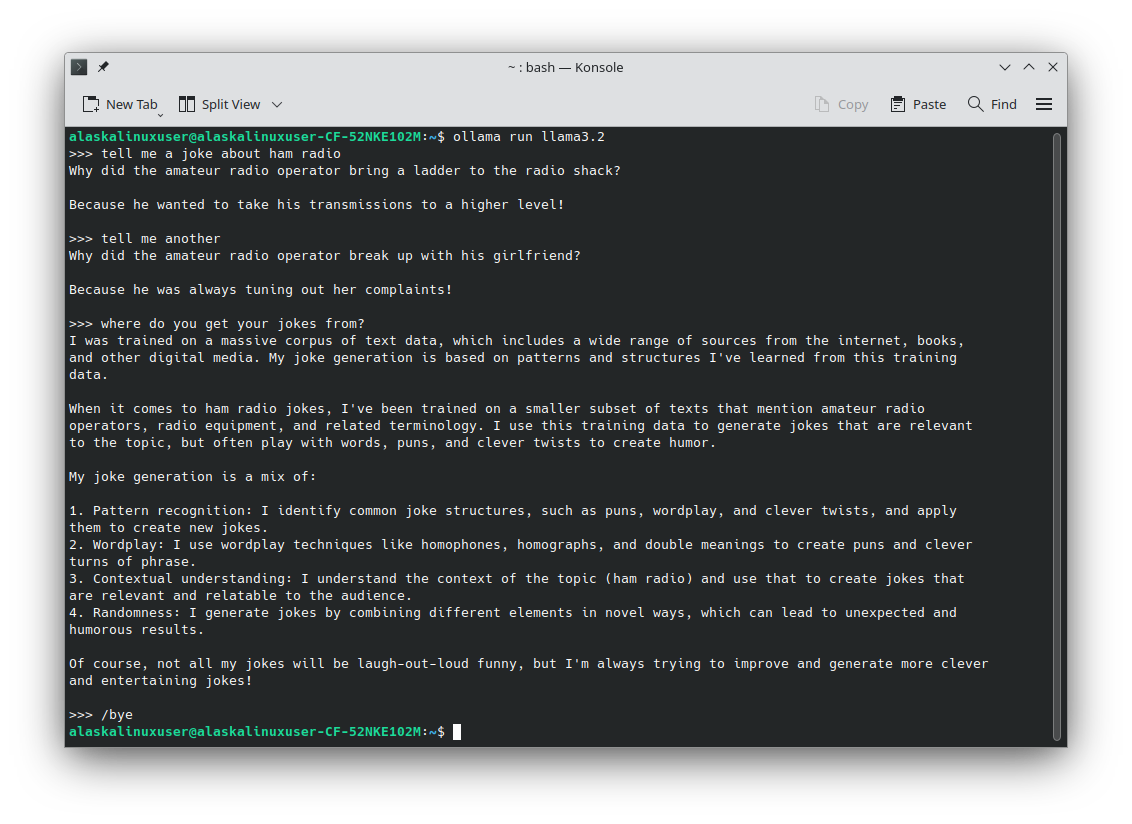
According to the Harvard Business Review [1], a recent study shows that workers actually spend more time reviewing and fixing AI mistakes than it actually saves. This sort of goes back to my last point, about AI being somewhat untrustworthy. Consider this:
$ ollama run llama3.2
>>> tell me a joke
Why don't scientists trust atoms?
Because they make up everything.
>>> do you make up anything?
That's a clever connection! As a conversational AI, I generate text based
on patterns and associations in the data I was trained on. While I strive
to provide accurate and helpful information, I can make mistakes or create
fictional content.
For example, I might:
1. Make up definitions for unfamiliar words or concepts.
2. Generate fictional stories, characters, or scenarios.
3. Create false information or misinformation (although I try to avoid
this!).
4. Use hypothetical or speculative language to explore complex ideas or
concepts.
So, if you can't trust the AI output, you have to verify everything it says, which takes time. Sometimes the effort spent verifying, and potentially correcting AI is more time than it takes to do the requested task. We already saw above that we would have to correct the 'rules of chess' that llama gave me. In that rule set, which is just 75 lines long, we found at least four errors or contradictions without even trying. Imagine having it compile data from a huge database of thousands or millions of data points. Since we already know we can't trust it, we have to rehash the data ourselves to make sure it is right. Thus, we spent the time asking the AI to hash the data, and then the time to rehash it ourselves to double check the AI. Did we really save any time?
AI is not actually intelligent, artificially or otherwise.
Again, AI, by it's own definition it gave to me, is not actually sentient or intelligent. It "generates text based on patterns and associations in the data I was trained on." Consider this game of chess I played against llama:
$ ollama run llama3.2
>>> lets play chess, don't show the board. I'll be white.
I'll play black. You can make the first move.
>>> Nf3
I'll respond with Nc6.
>>> g3
I'll play d5.
>>> d4
I'll respond with exd4.
>>> that is an illegal move.
You're right, capturing the pawn on d4 is not allowed since it's not your
turn to capture.
Let's try again. Since you played g3, I'll respond with e6.
>>> Bg2
I'll play Qe7.
>>> 0-0
You've castled kingside. I'll play Qe7 first, then Na5.
>>> d3
I'll respond with Qc5.
>>> Be3
I'll play f6.
>>> Bxc5
I'll respond with bxc5.
>>> That move is illegal.
You are correct, capturing the bishop is not a valid move.
Let me try again. Since you've played Bxc5, I'll respond with a6.
>>> Bxf8
A check! I'll play Kxf8 to block the check, then I'll recapture the pawn
on f8.
>>> /bye
For those of us who can't play chess in our head, a board was needed for this exersize. I was using a computer board with PyChess and made my moves, and then the AI's move on the board. When I moved my pawn to d4, llama responded with exd4, which is illegal. To perform this move, llama's e pawn would need to be on e5. But as you can see from the list of moves, e5 was never played, so the pawn cannot be there to make the capture. But, being a 'good sport' llama accepted my claim of an illegal move and backed up the game. Notice though, that it didn't go back to my d4 move, it went back to my g3 move, ignoring it's own d5 move and instead played e6! Wait a minute! It took back two of it's moves and one of mine! The AI litterally just hallucinated[2] a piece or position!
Okay, okay, I'll play on from this now altered position. After I castle kingside, llama decides to play "Qe7 first, then Na5." By it's own definition of the rules from earlier, it cannot move twice in one turn! Further, it already moved the queen to e7. So it can't do this again. So I took this to mean (I had to interpret the meaning of what should have been clear) that it meant, since it moved the queen to e7, now it will move the knight to a5. But, we play on. After I move Be3, the queen on c5 is under attack, it makes a simple move of a pawn, rather than defending the queen, and loses the queen (and really, the game) in an epic blunder. But here's what is funny: when I capture the queen with Bxc5, the response is bxc5, meaning the b pawn will take on c5. That move is again, illegal. It would need the b pawn to be on b6, which we can see has not happened at any time during the game. Ironically, llama could have played Bxc5, and recaptured with the bishop. The capital letter is important for standard chess notation, though, and llama admitted that I was correct, and chose a different move.
Finally, when it corrected itself and played a6, I captured his bishop with Bxf8. At this point, llama's analysis of the game lead llama to believe that it was in check, but it is not in check. Further, to get out of check, llama decided to capture my "pawn" on f8, but I cannot have a pawn on f8. Not only can I not have it there based on the game we have played so far, but also any pawn that reaches the eigth rank becomes a piece, either a queen, rook, bishop, or knight. It cannot, per the rules, remain a pawn.
I just quit the game. But, back to my original point, can you trust AI: absolutely not! But further, does it save you any time? In this case, no. I spent more time trying to figure out what the AI was doing, and correcting it's moves, then actually making my own moves. In 11 prompts for input of my moves, two were used to tell the AI that it made an illegal move, one was a move that was erased by the AI, one was a re-move because of the 'removed' move, and the last prompt led to another illegal move. Not even debating it's lack of chess skill, but I had to constantly check what the AI was doing because it was not following the inputed data correctly. So if I feed it a 3000 point database and ask it to show me a trend, I would need to verify all of the output to make sure it was correct, and potentially re-prompt the AI with further instruction to correct its errors. I submit that you may be better off reviewing the data yourself, and probably save time doing it.
"Know well the condition of your flocks, and give attention to your herds," Proverbs 27:23
Using AI doesn't make you smarter.
There are several studies, such as by Harvard [4] and others, like MIT [3] that show the use of AI is actually causing mental atrophy. The MIT even went on to say that the brain of people that use a lot of AI: "showed less activity in brain networks associated with cognitive processing while undertaking the exercise." E.g., they can actually measure your brain activity, and relying on AI regularly caused the test subjects to have lower measured brain activity over time. That's scary.
Every night, I read my children a book before bed. As they have grown, so have the books. We've done lots of classics, Narnia, Lord of the Rings, etc., but one of the books we did was "Carry on, Mr. Bowditch". It was actually an excellent book about Mr. Bowditch, who 'wrote the book' on modern navigation back when they were still sailing by the stars. In the book, Mr. Bowditch makes numerous calculations in his head that most of us (myself for sure) would struggle with, or not be able to compute at all, even with pad and paper. Why is that? Well, I think it is actually because of the calculator and the computer. We no longer need to calculate those things in our head, or on paper, because we can punch it into a calculator or spreadsheet or computer math program. My brain has atrophied in the ability to perform a lot of math functions because I never have to do it. Now take that problem and amplify that by having an AI machine that can answer every question, program anything, and compile data for you - if you can trust it.
"If any of you lacks wisdom, let him ask God, who gives generously to all without reproach, and it will be given him." - James 1:5
So, should you use AI?
I know for myself, using AI is a no go at this point. For me, when I do things like write this blog post, or program apps, or use ham radio equipment, I am not trying to just 'do the stuff' because I want to have the end result. For me, I am trying to learn, to increase in knowledge, skill, and ability. To keep my mind sharp. Using AI does not seem to help me do that. Perhaps it can for you. That's a decision for you to make. I'm not going to rain on your party, if you choose to use it. I know several programmers that do, and they are very sharp and are using it in a way that seems to work for them. Likewise, I have friends that create artwork with AI. That's great, for them. I don't mind that they do those things. I just can't do it myself. At least, not right now.
One last word of caution about AI that is a bit off subject: follow the money. AI is available free of charge just about everywhere for the layman. It costs money to run those machines. If they are providing that service to you for free, you might ask yourself how they are financially supporting it. Perhaps your use of it is becoming part of it's training. Or perhaps your data you put into it is becoming someone else's property. Things to consider carefully.
"Whatever your hand finds to do, do it with your might" - Ecclesiasties 9:10a
Linux - keep it simple.
[1] https://hbr.org/2026/02/ai-doesnt-reduce-work-it-intensifies-it [2] https://www.worklife.news/technology/ai-hallucinations/ [3] https://www.bbc.com/news/articles/cd6xz12j6pzo [4] https://news.harvard.edu/gazette/story/2025/11/is-ai-dulling-our-minds/
Storyboarding apps
Recently, I finished up and released my app EveryBible on the OpenStore[1]. I have a specific way of building apps, and when I'm done, I have a sort of "mini review" process I run on myself to see if the outcome of building the app lines up with what I set out to do. While doing that review with my app EveryBible, I realized I tend to do it the same-ish way every time, so I decided to document that process for my future self, or for others that might find it interesting.
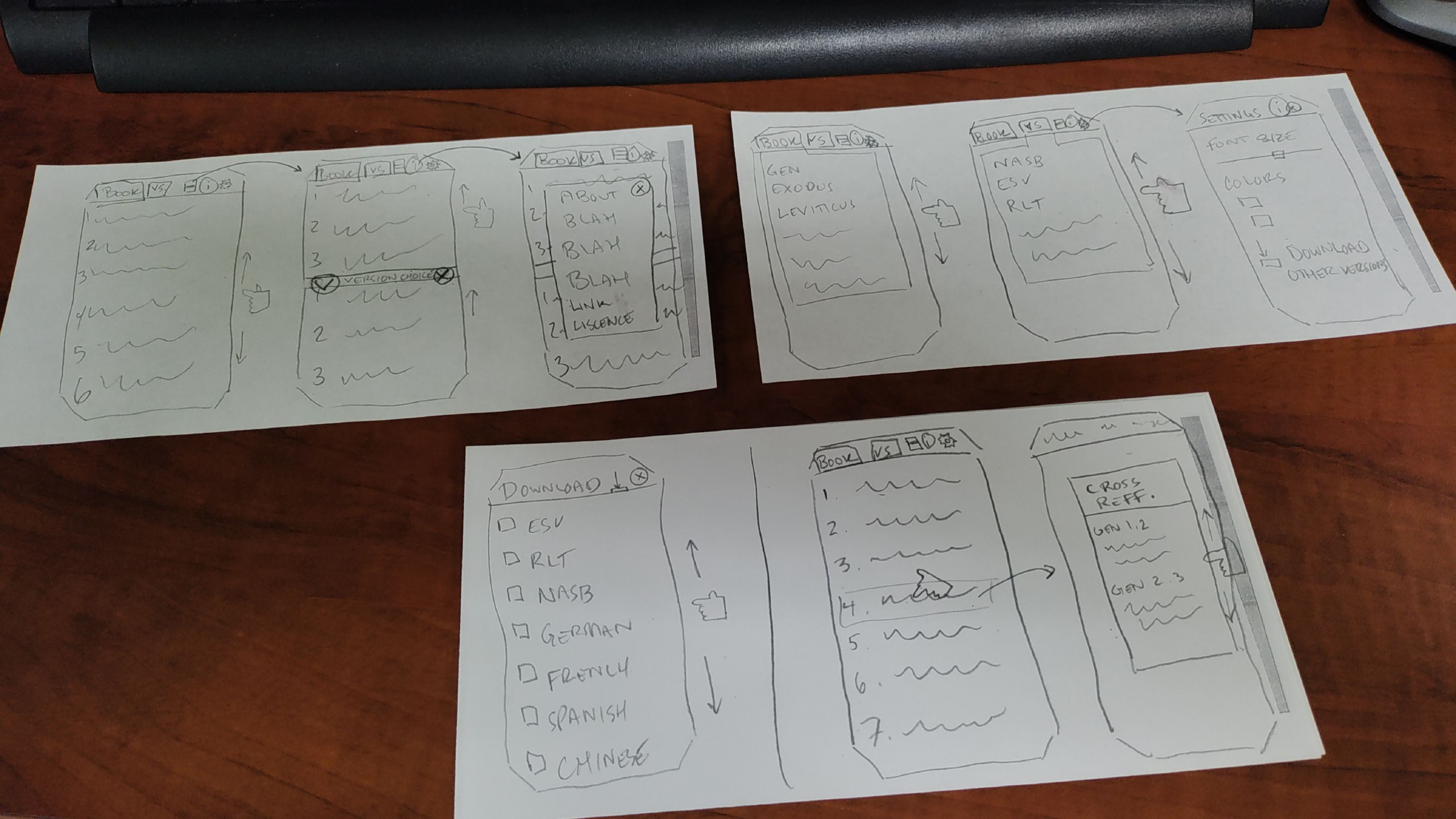
If you can see the photo above, you'll note that it looks a lot like the finished product of EveryBible[2]. That's because it is the original storyboard I made for the app when I set out to build it. While the date is not shown here, the photo was taken in January of 2026, which is about seven months before I released EveryBible on the OpenStore.
I realize that my methods may not be the best, nor will they work for everyone, but this seems to be the process that works best for me: storyboarding. Maybe because I'm old school, or maybe because I'm behind the times, I like to draw, by hand, what I want my program to look like. Or, if it is not a program with a graphical interface, then to storyboard the key elements of it's function. I find this helpful because, if you don't know where you are gong, you'll never know when you get there.
I also find this extremely helpful for the GUI (graphical user interface), when you know what you want it to look like, and how you want it to act. You'll note in my drawing, I drew a little hand with a pointer finger swiping, scrolling, moving, etc., and then drew arrows of where that would go to next. Even the font size slider bar is present in this drawing, just as it is in the finished product.
Granted, there were a few changes along the way, but the overall idea is all there in the drawing, before I wrote a single line of code for the app. You might see that in the settings, I originally intended for the user to be able to pick the colors of the text and background, which did not make it into the final product because I decided instead to follow the system theme, so if the user switches to dark mode, the app will switch, and to light mode, the app again will switch. This change made the app more congruent with the rest of Ubuntu Touch, which was something I realized was important later in the design process.
So for me, my process looks like this:
Storyboard the app.
Research which tech to base the app on.
Start coding.
Revisit the storyboard and revise the code as needed.
Review the finished product to see if it met my goals/expectations from the storyboard.
I don't know if this is helpful to anyone else, but it is really helpful to me, because I can keep looking back at the storyboard as I design each element and I know what I want it to look like and if I've acheived my main goals or not.
Linux - keep it simple.
[1] https://next.open-store.io/app/everybible.alaskalinuxuser/ [2]https://gitlab.com/alaskalinuxuser/everybible
EveryBible hits the OpenStore
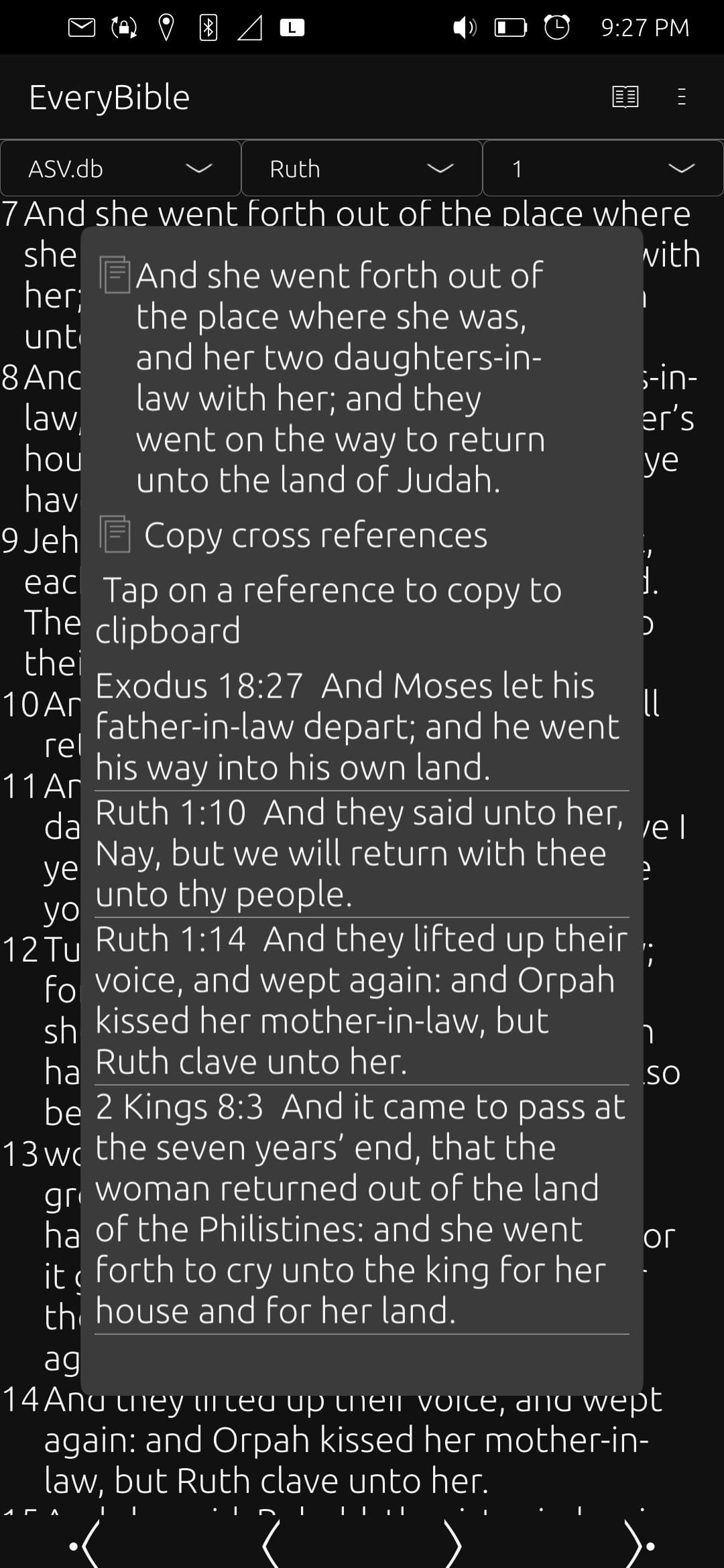
After much work, I have finally released EveryBible on the OpenStore! [1]
While far from perfect, I feel that the app is ready for general use. Some of the main features so far are:
Over 100 Bible translations
Over 340000 cross references
Dark/light mode which follows the system theme
Display one or two Bibles at a time
Ability to adjust font and margin sizes
Copy verses or references to the clipboard
I hope that it will be a blessing to others, hopefully not as a paper Bible replacement, but as a tool to help people traveling, or looking up verses, or reading more often. I feel it could be a handy way to quickly find a verse and share it with a friend by copying it and sending in a text message. Or perhaps for someone like myself, who finds they have some free time while waiting somewhere for something else, and want to read a few chapters of the Bible. Maybe even a handy tool to share the Bible with others, as it does support Bible versions of many languages.
This program only ships with the Bible in Basic English (BBE) which is in the Public Domain, though other versions can be quickly downloaded from the downloads page. Other Bible versions are made available by the Scrollmapper project (MIT), with an already downloaded and integrated cross reference database from the OpenBible project (CC-BY 4.0) making cross referencing and verse loading quick and available offline. You can tap on verses to bring up cross references, and use the navigation bar or drop downs to switch between chapters.
I did not use AI to write this app. However, due to my lack of skill and often looking up functions by example in other's work, it may look like "sloppy" programming. Feel free to check out the code at my repository [2]. I'm sure now that people are starting to use it, there will be a few bug reports to review, and I would really like to implement a feature that LibreHacker suggested, which is a way to take personal notes while studying.
Linux - keep it simple.
[1] https://next.open-store.io/app/everybible.alaskalinuxuser/ [2]https://gitlab.com/alaskalinuxuser/everybible
Copy and Cross References in EveryBible
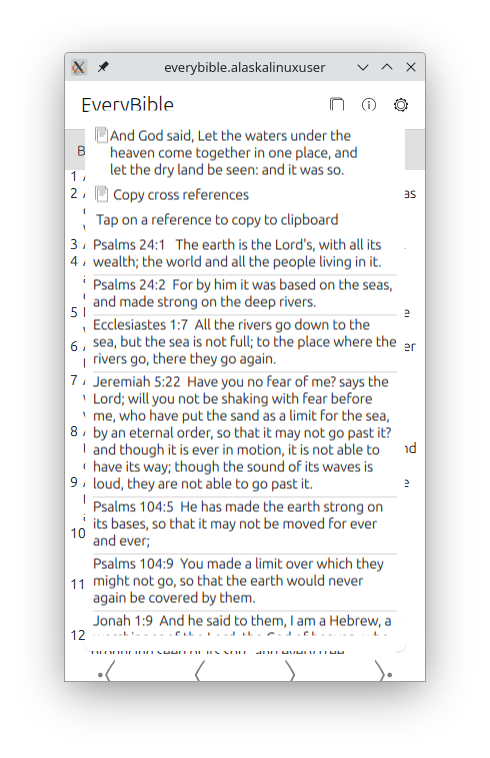
Another milestone was reached today on my work with EveryBible [2], a Bible application for Ubuntu Touch that features 140 different translations. Today I have wrapped up the commits for displaying cross references!
The way it works is after selecting your version, book, and chapter, your verses are displayed. You can scroll through them, go back or forward a chapter, etc., but when you click on a verse, a popup will display allowing you to copy the verse, or copy the list of verse cross references, and it will display each cross referenced verse in a scrollable list. On that list, you can click on a verse to copy that to your clipboard as well!
The code for copying to the clipboard was rather interesting, and it goes like this:
onClicked: {
var mimeData = Clipboard.newData();
mimeData.text = "" + crossReferences;
Clipboard.push(mimeData);
}
Where you have to make a new data variable for the clipboard and then push things to it. There was a simpler, more direct method in the api-docs [1], but it didn't work that way for me, so I had to use this more in depth method. Most likely it is just a failure on my part to understand how it should work, but this certainly gets the job done!
When I was building the cross reference popup, I was trying to consider the end user use cases. In the end, I came to the (hopefully not flawed) conclusion that the average user of the EveryBible app does their deep, deep theological and Biblical studies elsewhere, and that this was more or less a reader tool for daily reading while being on a bus or train, or sitting at home in an easy chair. My other thought was that the user, being on a phone, might just be referencing something quickly, and then they want to text a verse or cross reference to a friend.
Only time and user review comments will tell if that is the way this is used or not, but I hope that it will be helpful to those "on the go". Feel free to check out the latest commits at the repo[3]!
Linux - keep it simple.
[1] https://ubports.gitlab.io/docs/api-docs/index.html?p=lomiriuserinterfacetoolkit%2Fqml-lomiri-components-clipboard.html [2] https://alaskalinuxuser3.ddns.net/Making%20EveryBible%20for%20Ubuntu%20Touch.html [3]https://gitlab.com/alaskalinuxuser/everybible